Wednesday, 19 October 2011 15:24

RokGallery Extension (J1.5/1.7)

Written by 
Rate this item
(0 votes)
RokGallery

RokGallery is a ground-up revolutionary gallery extension, developed to be hugely flexible, customizable and thus extendable far into the future.

Description

The system itself is built on a custom tag-based architecture with the ability to have multiple tag-based galleries. RokGallery uses design and concepts that have been traditionally reserved for platform-native applications and are for the first time making their way into a web environment. For example, you will not have to resize images, or make thumbs before using them in RokGallery, just upload the raw image and use the RokGallery slice editor to resize and crop the images. This non-destructive editing method allows you to create and edit your image size, cropped view, etc, at any point without having to reupload or recreate your image in external photo editing software.

Other features include an all-new multi-file image upload mechanism that incorporates the latest HTML5 drag-and-drop upload functionality, but can also fall back to Flash if your browser doesn’t yet support this feature. Compound filtering can be used to isolate specific images you are looking for and a sophisticated Jobs Manager handles processes like image resizing in the background so you can get on with your work without having to wait for time-consuming image computations to complete.

Access the RokGallery Component at Admin → Components → RokGallery

RokGallery

This section is an introduction to the general interface of RokGallery, specific instructions on the functions, such as filtering, will be explained below.

#1 Image Controls

  • Publish
  • Unpublish
  • Tag
  • Delete

#2 Gallery Controls

  • Jobs: A log of all previous and current operations, such as imports.
  • Galleries: Create, Delete and Manage all tag galleries.
  • Settings: Configuration the general aspects of RokGallery.
  • Upload: A HTML5/Flash drag and drop image uploader.

#3/4 Filters

The filters have a range of variables such as gallery, file type, published etc... to allow you to sort your images for management in an efficient and simple manner. Statistics for the filters appear at #4.

Photo Upload

RokGallery uses a HTMl5 file uploader, or Flash for unsupported browsers.

  • Go to Admin → Components → RokGallery
  • Click the Upload button
  • Either Drag and Drop the files, or click Browse and find
  • Click Upload
  • Monitor progress
  • Click Close once completed

RokGallery RokGallery

RokGallery RokGallery

RokGallery RokGallery

Gallery View and Jobs

All photos will appear at Admin → Components → RokGallery. RokGallery has support for multiple image selection, either by drag and highlight with the cursor, or via individual selection with the Shift Key and click.

RokGallery RokGallery

RokGallery

Jobs Manager

The Jobs Manager provides you a log of operations undergoing or undergone in RokGallery. You can view:

  • Import status, with time stamps
  • Slice status, with time stamps
  • Clear all Jobs
  • Delete individual Jobs via the trash icon
  • Refresh individuals Jobs via the reload icon

Galleries Manager

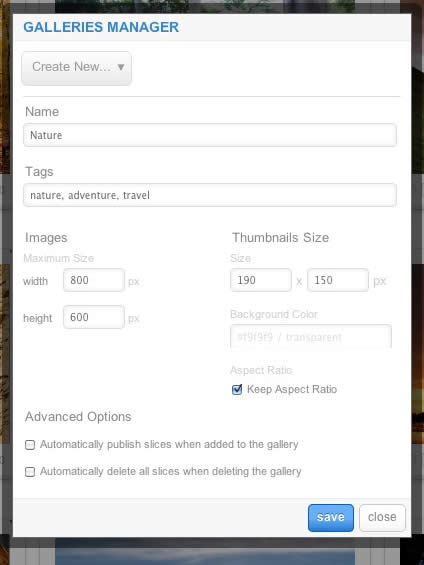
RokGallery is a tagged based gallery component, therefore, Galleries are controlled by tags and not specific photos in albums. Subsequently, you can easily have one master photo in multiple albums with ease.

RokGallery

A single image can appear in numerous galleries based on its tag, and also can be different sizes based on the gallery settings, without editing the original image.

  • Dropdown: To create a new Gallery, select Create New, or the name of another Gallery to edit it
  • Name: Set the name of the Gallery
  • Tags: Set the tags that are associated with the gallery (separate via a comma)
  • Images: Set the maximum height and width of the full image
  • Thumbnails Size: Set the height and width of the thumbnails
  • Background Color: Set the background color for the thumbnail surround
  • Aspect Ratio: Check if you wish to keep the dimensions of the image intact, or cropped.

Remember to Publish a Gallery after clicking Save. If you make any changes to a Gallery, whether in the Galleries Manager, or in the Image Slice Editor, you will need to re-Save in the Galleries Manager for the changes to take place on the site.

RokGallery RokGallery RokGallery

Image Editor

RokGallery has a very advanced image editor, akin to a native application. The various parts will be discussed below.

After selecting the edit button, you will be able to edit the META data of the image, the image itself, plus delete or publish the image.

  • Title: The name of the image file to be displayed on the frontend gallery
  • Slug: The individual identifier for an image (we recommend not to change)
  • Description: The description of the image file shown on the frontend gallery
  • Tags: Add the tags that you wish to associate with the image
  • Slicing: Edit the image
  • Publish:Show or Hide an image for specific tags/galleries.

RokGallery

In the Slice Editor, you can edit the META data and the actual image. You can crop the image, similar to that of an native application, with a set or variable marquee, in addition to Zoom controls. Edits in the Slice Editor are on a per gallery/tag basis.

The original image that was uploaded is maintained, as a new image is created after applying the crop. This can be reverted at any time from the Slice Editor.

RokGallery

Additionally, you can also Share the slice via the Share button, or Delete the image via the Delete button, from the Image Editor:

RokGallery RokGallery

Multi-Tagging

Tagging is at the core of RokGallery, and with its multi-selection ability, you can easily manage tags across multiple images with great ease. Simply highlight several images and click Tags. Here, you can add, remove, or change any common tags applied to your selection.

If you wanted to quickly move several images to another gallery, simply change their tag.

RokGallery

Filtering

RokGallery

A system based on tagging needs an advanced search facility, so RokGallery employs a simple but powerful filtering mechanism:

Filter Type

  • Tags
  • Gallery
  • Published
  • File Size
  • Width
  • Height

Filter Operation

  • Is
  • Is Not
  • Contains
  • Does not Contain
  • Greater than
  • Lesser than

Order by Type (Asc/Des)

  • Title
  • Created At
  • Updated At
  • File Size
  • Width
  • Height

RokGallery RokGallery

RokGallery RokGallery

Filters are not singular and can be applied cumulatively:

RokGallery RokGallery

Read 8929149 times Last modified on Sunday, 30 October 2011 00:17

270731 comments

  • Comment Link magic red Friday, 13 November 2026 20:30 posted by magic red

    Greate post. Keep posting such kind of info on your page. Im really impressed by it.

  • Comment Link double down Friday, 13 November 2026 20:29 posted by double down

    Wow that was unusual. I just wrote an really long comment but after I clicked submit my comment didn't show up. Grrrr... well I'm not writing all that over again. Regardless, just wanted to say excellent blog!

  • Comment Link west casino Friday, 13 November 2026 20:29 posted by west casino

    Greate article. Keep writing such kind of information on your site. Im really impressed by it.

  • Comment Link solpump Friday, 13 November 2026 19:49 posted by solpump

    May I just say what a comfort to uncover somebody who really knows what they are discussing on the web. You certainly realize how to bring an issue to light and make it important. More people must look at this and understand this side of the story. I can't believe you are not more popular since you most certainly have the gift.

  • Comment Link lucky dino Friday, 13 November 2026 19:39 posted by lucky dino

    May I simply just say what a relief to discover somebody that truly understands what they're talking about on the internet. You definitely realize how to bring a problem to light and make it important. More and more people really need to check this out and understand this side of the story. I was surprised you aren't more popular since you surely possess the gift.

  • Comment Link cozino Friday, 13 November 2026 19:29 posted by cozino

    Currently it appears like BlogEngine is the best blogging platform out there right now. (from what I've read) Is that what you're using on your blog?

  • Comment Link gahudinOvEde Friday, 13 November 2026 17:43 posted by gahudinOvEde

    Центр КТ ЛОР-органов и челюстно-лицевой области принимает пациентов в Сочи на Навагинской. Томограф NewTom VGi Evo дает 3D-снимки пазух носа, височных костей, орбит, челюстей и ВНЧС при дозе от 0,1 мЗв. На сканирование уходит меньше одной минуты. Записаться на обследование можно на сайте https://kt-sochi.lorlor.ru/ без направления врача. Готовые снимки поступают на почту пациента за два часа. Центр принимает маленьких пациентов начиная с пяти лет. Готовиться к КТ не требуется, перед процедурой снимают только очки и украшения.

  • Comment Link zoom zoom Friday, 13 November 2026 16:41 posted by zoom zoom

    zoom 的屏幕共享体验非常出色,可以快速展示文档、演示文稿和工作内容,让线上讨论更加直观高效。

  • Comment Link Precision Machining Friday, 13 November 2026 16:29 posted by Precision Machining

    My spouse and I absolutely love your blog and find a
    lot of your post's to be just what I'm looking for.
    can you offer guest writers to write content for you?
    I wouldn't mind producing a post or elaborating on many of the
    subjects you write related to here. Again, awesome
    weblog!

  • Comment Link vuvevidseess Friday, 13 November 2026 16:22 posted by vuvevidseess

    Надежность современных архитектурных систем и фасадных решений напрямую зависит от прочности несущего металлокаркаса. Компания https://waltzprof.com/ производит высококачественный стальной профиль для стильных лофт-перегородок, теплых оконных групп и надежных противопожарных преград. Точная геометрия, заводское качество и прочность систем обеспечивают безопасность и долговечность любого проекта.

Leave a comment

Make sure you enter the (*) required information where indicated. HTML code is not allowed.