Wednesday, 19 October 2011 15:24

RokGallery Extension (J1.5/1.7)

Written by 
Rate this item
(0 votes)
RokGallery

RokGallery is a ground-up revolutionary gallery extension, developed to be hugely flexible, customizable and thus extendable far into the future.

Description

The system itself is built on a custom tag-based architecture with the ability to have multiple tag-based galleries. RokGallery uses design and concepts that have been traditionally reserved for platform-native applications and are for the first time making their way into a web environment. For example, you will not have to resize images, or make thumbs before using them in RokGallery, just upload the raw image and use the RokGallery slice editor to resize and crop the images. This non-destructive editing method allows you to create and edit your image size, cropped view, etc, at any point without having to reupload or recreate your image in external photo editing software.

Other features include an all-new multi-file image upload mechanism that incorporates the latest HTML5 drag-and-drop upload functionality, but can also fall back to Flash if your browser doesn’t yet support this feature. Compound filtering can be used to isolate specific images you are looking for and a sophisticated Jobs Manager handles processes like image resizing in the background so you can get on with your work without having to wait for time-consuming image computations to complete.

Access the RokGallery Component at Admin → Components → RokGallery

RokGallery

This section is an introduction to the general interface of RokGallery, specific instructions on the functions, such as filtering, will be explained below.

#1 Image Controls

  • Publish
  • Unpublish
  • Tag
  • Delete

#2 Gallery Controls

  • Jobs: A log of all previous and current operations, such as imports.
  • Galleries: Create, Delete and Manage all tag galleries.
  • Settings: Configuration the general aspects of RokGallery.
  • Upload: A HTML5/Flash drag and drop image uploader.

#3/4 Filters

The filters have a range of variables such as gallery, file type, published etc... to allow you to sort your images for management in an efficient and simple manner. Statistics for the filters appear at #4.

Photo Upload

RokGallery uses a HTMl5 file uploader, or Flash for unsupported browsers.

  • Go to Admin → Components → RokGallery
  • Click the Upload button
  • Either Drag and Drop the files, or click Browse and find
  • Click Upload
  • Monitor progress
  • Click Close once completed

RokGallery RokGallery

RokGallery RokGallery

RokGallery RokGallery

Gallery View and Jobs

All photos will appear at Admin → Components → RokGallery. RokGallery has support for multiple image selection, either by drag and highlight with the cursor, or via individual selection with the Shift Key and click.

RokGallery RokGallery

RokGallery

Jobs Manager

The Jobs Manager provides you a log of operations undergoing or undergone in RokGallery. You can view:

  • Import status, with time stamps
  • Slice status, with time stamps
  • Clear all Jobs
  • Delete individual Jobs via the trash icon
  • Refresh individuals Jobs via the reload icon

Galleries Manager

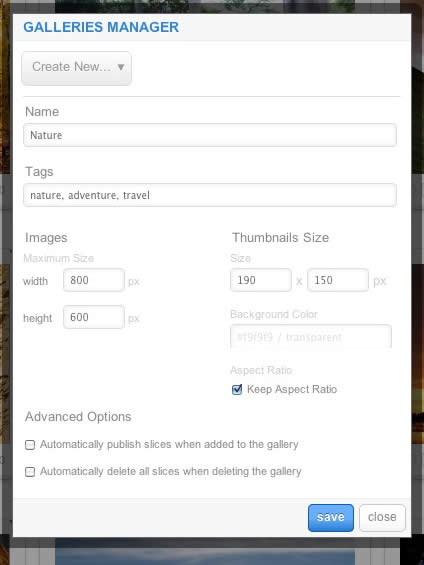
RokGallery is a tagged based gallery component, therefore, Galleries are controlled by tags and not specific photos in albums. Subsequently, you can easily have one master photo in multiple albums with ease.

RokGallery

A single image can appear in numerous galleries based on its tag, and also can be different sizes based on the gallery settings, without editing the original image.

  • Dropdown: To create a new Gallery, select Create New, or the name of another Gallery to edit it
  • Name: Set the name of the Gallery
  • Tags: Set the tags that are associated with the gallery (separate via a comma)
  • Images: Set the maximum height and width of the full image
  • Thumbnails Size: Set the height and width of the thumbnails
  • Background Color: Set the background color for the thumbnail surround
  • Aspect Ratio: Check if you wish to keep the dimensions of the image intact, or cropped.

Remember to Publish a Gallery after clicking Save. If you make any changes to a Gallery, whether in the Galleries Manager, or in the Image Slice Editor, you will need to re-Save in the Galleries Manager for the changes to take place on the site.

RokGallery RokGallery RokGallery

Image Editor

RokGallery has a very advanced image editor, akin to a native application. The various parts will be discussed below.

After selecting the edit button, you will be able to edit the META data of the image, the image itself, plus delete or publish the image.

  • Title: The name of the image file to be displayed on the frontend gallery
  • Slug: The individual identifier for an image (we recommend not to change)
  • Description: The description of the image file shown on the frontend gallery
  • Tags: Add the tags that you wish to associate with the image
  • Slicing: Edit the image
  • Publish:Show or Hide an image for specific tags/galleries.

RokGallery

In the Slice Editor, you can edit the META data and the actual image. You can crop the image, similar to that of an native application, with a set or variable marquee, in addition to Zoom controls. Edits in the Slice Editor are on a per gallery/tag basis.

The original image that was uploaded is maintained, as a new image is created after applying the crop. This can be reverted at any time from the Slice Editor.

RokGallery

Additionally, you can also Share the slice via the Share button, or Delete the image via the Delete button, from the Image Editor:

RokGallery RokGallery

Multi-Tagging

Tagging is at the core of RokGallery, and with its multi-selection ability, you can easily manage tags across multiple images with great ease. Simply highlight several images and click Tags. Here, you can add, remove, or change any common tags applied to your selection.

If you wanted to quickly move several images to another gallery, simply change their tag.

RokGallery

Filtering

RokGallery

A system based on tagging needs an advanced search facility, so RokGallery employs a simple but powerful filtering mechanism:

Filter Type

  • Tags
  • Gallery
  • Published
  • File Size
  • Width
  • Height

Filter Operation

  • Is
  • Is Not
  • Contains
  • Does not Contain
  • Greater than
  • Lesser than

Order by Type (Asc/Des)

  • Title
  • Created At
  • Updated At
  • File Size
  • Width
  • Height

RokGallery RokGallery

RokGallery RokGallery

Filters are not singular and can be applied cumulatively:

RokGallery RokGallery

Read 7885155 times Last modified on Sunday, 30 October 2011 00:17

206671 comments

  • Comment Link Adrianroash Sunday, 07 July 2024 13:42 posted by Adrianroash

    KMSpico Download | Official KMS Website New July 2024
    microsoft toolkit office
    Are you looking for the best tool to activate your Windows & Office? Then you should download and install KMSpico, as it is one of the best tools everyone should have. In this article, I will tell you everything about this fantastic tool, even though I will also tell you if this is safe to use.

    In this case, don’t forget to read this article until the end, so you don’t miss any critical information. This guide is for both beginners and experts as I came up with some of the rumours spreading throughout the internet.

    Perhaps before we move towards downloading or installing a section, we must first understand this tool. You should check out the guide below on this tool and how it works; if you already know about it, you can move to another section.
    What is KMSPico?
    KMPico is a tool that is used to activate or get a license for Microsft Windows as well as for MS Office. It was developed by one of the most famous developers named, Team Daz. However, it is entirely free to use. There is no need to purchase it or spend money downloading it. This works on the principle of Microsft’s feature named Key Management Server, a.k.a KMS (KMSPico named derived from it).

    The feature is used for vast companies with many machines in their place. In this way, it is hard to buy a Windows License for each device,, which is why KMS introduced. Now a company has to buy a KMS server for them and use it when they can get a license for all their machines.

    However, this tool also works on it, and similarly, it creates a server on your machine and makes it look like a part of that server. One thing different is that this tool only keeps the product activated for 180 days. This is why it keeps running on your machine, renews the license keys after 180 days, and makes it a permanent activation.

    KMSAuto Net
    Microsoft Toolkit
    Windows Loader
    Windows 10 Activator
    Features
    We already know what this tool means, so let’s talk about some of the features you are getting along with KMSPico. Reading this will surely help you understand whether you are downloading the correct file.

    Ok, so here are some of the features that KMSPico provides:

    Activate Windows & Office

    We have already talked about this earlier, as using this tool, you will get the installation key for both Microsoft Products. Whether it is Windows or Office, you can get a license in no time; however, this supports various versions.

    Supports Multi-Arch

    Since this supports both products, it doesn’t mean you have to download separate versions for each arch. One version is enough, and you can get the license for both x32-bit or even the x64-bit.

    It Is Free To Use

    Undoubtedly, everything developed by Team Daz costs nothing to us. Similarly, using this tool won’t cost you either, as it is entirely free. Other than this, it doesn’t come with any ads, so using it won’t be any trouble.

    Permanent License

    Due to the KMS server, this tool installs on our PC, we will get the license key for the rest of our lives. This is because the license automatically renews after a few days. To keep it permanent, you must connect your machine to the internet once 180 days.

    Virus Free

    Now comes the main feature of this tool that makes it famous among others. KMSPico is 100% pure and clean from such viruses or trojans. The Virus Total scans it before uploading to ensure it doesn’t harm our visitors.

  • Comment Link bokep indonesia Sunday, 07 July 2024 13:36 posted by bokep indonesia

    Hi there would you mind letting me know which webhost you're working
    with? I've loaded your blog in 3 different internet browsers and I must say this blog loads a
    lot quicker then most. Can you recommend a good internet hosting
    provider at a fair price? Cheers, I appreciate it!

  • Comment Link Johnestisp Sunday, 07 July 2024 13:33 posted by Johnestisp

    adresГЎЕ™

  • Comment Link ラブドール オナニー Sunday, 07 July 2024 13:29 posted by ラブドール オナニー

    The sex doll industry has evolved [url="https://www.jp-dolls.com/goods/p1823.html"]ドール オナニー[/url]to offer feature-rich collections, incorporating breathing options, anal sex pleasure skin

  • Comment Link ناصر رسولی Sunday, 07 July 2024 13:08 posted by ناصر رسولی

    سلام!
    ناصر رسولی هستم
    من ناصر رسولی هستم مدیر پلتفرم ارسال رپورتاژ سئو هکر با بیش از 5000 دامنه فعال ایرانی و خارجی ، با اجرای
    بیش از 3000 پروژه موفق سئو ، با اجرای بیش از 1200 مشاوره موفق سئو ، اولین معرف سیستم PBN
    و PDN در ایران ، آموزش دهنده سئو منفی ، سئو خاکستری
    ، سئو سیاه با جدیدترین متدهای روز دنیا…

    در این وب سایت سعی بر این دارم
    از تجربیاتم در دنیای وسیع سئو بگم
    و در حد توان کمکتون کنم که بتونید تجربه شیرینی از سئو داشته باشید.

    https://seohacker.academy/blog/
    سئو هکر آکادمی
    سئو هکر

  • Comment Link Luxury and Affordable Brands Sunday, 07 July 2024 13:05 posted by Luxury and Affordable Brands

    First of all I want to say terrific blog!

    I had a quick question that I'd like to ask if you don't mind.
    I was curious to find out how you center yourself and clear your mind before
    writing. I've had a tough time clearing my thoughts in getting my ideas out.

    I do take pleasure in writing but it just seems like the first 10 to 15 minutes are generally lost simply just
    trying to figure out how to begin. Any ideas or hints?
    Appreciate it!

  • Comment Link 高級 ダッチワイフ Sunday, 07 July 2024 12:35 posted by 高級 ダッチワイフ

    However, its range of motion is constrained and[url="https://www.jp-dolls.com/goods/p1669.html"]人形 えろ[/url] cannot accommodate extreme movements. This option suits customers seeking moderate hand mobility for their dolls.

  • Comment Link ラブドール中古 Sunday, 07 July 2024 12:33 posted by ラブドール中古

    [url="https://www.jp-dolls.com/goods/p1042.html"]セックス ロボット[/url]What they don't have is sustained,if any,

  • Comment Link ラブドール中古 Sunday, 07 July 2024 12:30 posted by ラブドール中古

    [url="https://www.jp-dolls.com/"]ラブドール[/url]Yes,people with narcissistic disorders can manipulate,

  • Comment Link ラブドール中古 Sunday, 07 July 2024 12:29 posted by ラブドール中古

    [url="https://www.jp-dolls.com/category/c2p8.html"]ラブドール 中古[/url]They will dip down into a bottomless cauldron of antipathy and like an arterial spurt,will spew this toxic brew far and wide with metronomic regularity.

Leave a comment

Make sure you enter the (*) required information where indicated. HTML code is not allowed.