Wednesday, 19 October 2011 15:24

RokGallery Extension (J1.5/1.7)

Written by 
Rate this item
(0 votes)
RokGallery

RokGallery is a ground-up revolutionary gallery extension, developed to be hugely flexible, customizable and thus extendable far into the future.

Description

The system itself is built on a custom tag-based architecture with the ability to have multiple tag-based galleries. RokGallery uses design and concepts that have been traditionally reserved for platform-native applications and are for the first time making their way into a web environment. For example, you will not have to resize images, or make thumbs before using them in RokGallery, just upload the raw image and use the RokGallery slice editor to resize and crop the images. This non-destructive editing method allows you to create and edit your image size, cropped view, etc, at any point without having to reupload or recreate your image in external photo editing software.

Other features include an all-new multi-file image upload mechanism that incorporates the latest HTML5 drag-and-drop upload functionality, but can also fall back to Flash if your browser doesn’t yet support this feature. Compound filtering can be used to isolate specific images you are looking for and a sophisticated Jobs Manager handles processes like image resizing in the background so you can get on with your work without having to wait for time-consuming image computations to complete.

Access the RokGallery Component at Admin → Components → RokGallery

RokGallery

This section is an introduction to the general interface of RokGallery, specific instructions on the functions, such as filtering, will be explained below.

#1 Image Controls

  • Publish
  • Unpublish
  • Tag
  • Delete

#2 Gallery Controls

  • Jobs: A log of all previous and current operations, such as imports.
  • Galleries: Create, Delete and Manage all tag galleries.
  • Settings: Configuration the general aspects of RokGallery.
  • Upload: A HTML5/Flash drag and drop image uploader.

#3/4 Filters

The filters have a range of variables such as gallery, file type, published etc... to allow you to sort your images for management in an efficient and simple manner. Statistics for the filters appear at #4.

Photo Upload

RokGallery uses a HTMl5 file uploader, or Flash for unsupported browsers.

  • Go to Admin → Components → RokGallery
  • Click the Upload button
  • Either Drag and Drop the files, or click Browse and find
  • Click Upload
  • Monitor progress
  • Click Close once completed

RokGallery RokGallery

RokGallery RokGallery

RokGallery RokGallery

Gallery View and Jobs

All photos will appear at Admin → Components → RokGallery. RokGallery has support for multiple image selection, either by drag and highlight with the cursor, or via individual selection with the Shift Key and click.

RokGallery RokGallery

RokGallery

Jobs Manager

The Jobs Manager provides you a log of operations undergoing or undergone in RokGallery. You can view:

  • Import status, with time stamps
  • Slice status, with time stamps
  • Clear all Jobs
  • Delete individual Jobs via the trash icon
  • Refresh individuals Jobs via the reload icon

Galleries Manager

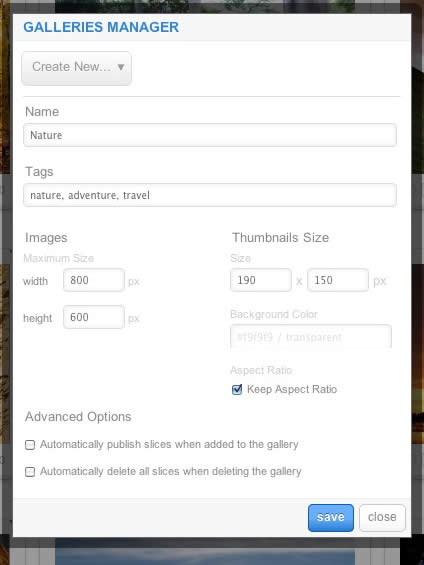
RokGallery is a tagged based gallery component, therefore, Galleries are controlled by tags and not specific photos in albums. Subsequently, you can easily have one master photo in multiple albums with ease.

RokGallery

A single image can appear in numerous galleries based on its tag, and also can be different sizes based on the gallery settings, without editing the original image.

  • Dropdown: To create a new Gallery, select Create New, or the name of another Gallery to edit it
  • Name: Set the name of the Gallery
  • Tags: Set the tags that are associated with the gallery (separate via a comma)
  • Images: Set the maximum height and width of the full image
  • Thumbnails Size: Set the height and width of the thumbnails
  • Background Color: Set the background color for the thumbnail surround
  • Aspect Ratio: Check if you wish to keep the dimensions of the image intact, or cropped.

Remember to Publish a Gallery after clicking Save. If you make any changes to a Gallery, whether in the Galleries Manager, or in the Image Slice Editor, you will need to re-Save in the Galleries Manager for the changes to take place on the site.

RokGallery RokGallery RokGallery

Image Editor

RokGallery has a very advanced image editor, akin to a native application. The various parts will be discussed below.

After selecting the edit button, you will be able to edit the META data of the image, the image itself, plus delete or publish the image.

  • Title: The name of the image file to be displayed on the frontend gallery
  • Slug: The individual identifier for an image (we recommend not to change)
  • Description: The description of the image file shown on the frontend gallery
  • Tags: Add the tags that you wish to associate with the image
  • Slicing: Edit the image
  • Publish:Show or Hide an image for specific tags/galleries.

RokGallery

In the Slice Editor, you can edit the META data and the actual image. You can crop the image, similar to that of an native application, with a set or variable marquee, in addition to Zoom controls. Edits in the Slice Editor are on a per gallery/tag basis.

The original image that was uploaded is maintained, as a new image is created after applying the crop. This can be reverted at any time from the Slice Editor.

RokGallery

Additionally, you can also Share the slice via the Share button, or Delete the image via the Delete button, from the Image Editor:

RokGallery RokGallery

Multi-Tagging

Tagging is at the core of RokGallery, and with its multi-selection ability, you can easily manage tags across multiple images with great ease. Simply highlight several images and click Tags. Here, you can add, remove, or change any common tags applied to your selection.

If you wanted to quickly move several images to another gallery, simply change their tag.

RokGallery

Filtering

RokGallery

A system based on tagging needs an advanced search facility, so RokGallery employs a simple but powerful filtering mechanism:

Filter Type

  • Tags
  • Gallery
  • Published
  • File Size
  • Width
  • Height

Filter Operation

  • Is
  • Is Not
  • Contains
  • Does not Contain
  • Greater than
  • Lesser than

Order by Type (Asc/Des)

  • Title
  • Created At
  • Updated At
  • File Size
  • Width
  • Height

RokGallery RokGallery

RokGallery RokGallery

Filters are not singular and can be applied cumulatively:

RokGallery RokGallery

Read 7785715 times Last modified on Sunday, 30 October 2011 00:17

205080 comments

  • Comment Link web site Friday, 01 May 2026 19:55 posted by web site

    Nice post. I was checking continuously this blog and I am
    impressed! Extremely helpful info specifically the last part
    :) I care for such info much. I was looking for this particular info for a
    very long time. Thank you and best of luck.

  • Comment Link Winvest investment Friday, 01 May 2026 19:23 posted by Winvest investment

    Hello there, just became alert to your blog through Google, and found
    that it's really informative. I'm going to watch out
    for brussels. I will appreciate if you continue
    this in future. A lot of people will be benefited
    from your writing. Cheers!

  • Comment Link Https://Www.Solutiongraniteetquartz.com Friday, 01 May 2026 18:31 posted by Https://Www.Solutiongraniteetquartz.com

    Hi, Neat post. There is a problem with your web site in web explorer, might test this?
    IE still is the market chief and a good component to
    other folks will pass over your wonderful writing because of this problem. https://Www.solutiongraniteetquartz.com/

  • Comment Link david hoffmeister wikipedia Friday, 01 May 2026 17:08 posted by david hoffmeister wikipedia

    Hi there! Quick question that's completely off topic.
    Do you know how to make your site mobile friendly? My website looks weird when browsing from my iphone4.
    I'm trying to find a theme or plugin that might be able to resolve this problem.

    If you have any suggestions, please share. Many thanks!

  • Comment Link david hoffmeister wikipedia Friday, 01 May 2026 16:59 posted by david hoffmeister wikipedia

    With havin so much written content do you ever run into any problems of plagorism or copyright violation? My website has a
    lot of completely unique content I've either created myself or outsourced but it looks
    like a lot of it is popping it up all over the internet without my agreement.
    Do you know any methods to help stop content from being stolen? I'd
    definitely appreciate it.

  • Comment Link david hoffmeister Wikipedia about david hoffmeister Friday, 01 May 2026 16:31 posted by david hoffmeister Wikipedia about david hoffmeister

    Thanks , I have just been searching for info about this topic
    for a long time and yours is the best I've
    discovered till now. However, what concerning
    the conclusion? Are you positive about the source?

  • Comment Link midi keyboard controller Friday, 01 May 2026 16:03 posted by midi keyboard controller

    WOW just what I was looking for. Came here by searching for pbc

  • Comment Link 555win Friday, 01 May 2026 15:36 posted by 555win

    555win không ngừng nâng cấp hệ thống nhằm mang đến môi trường chơi game an toàn, bảo mật và công bằng cho mọi thành viên.

  • Comment Link keyboard piano Friday, 01 May 2026 15:14 posted by keyboard piano

    Hey There. I found your blog using msn. This is a very well written article.
    I'll be sure to bookmark it and return to read more of your useful information. Thanks for the post.

    I'll certainly return.

  • Comment Link wengtoto slot Friday, 01 May 2026 15:05 posted by wengtoto slot

    These are genuinely wonderful ideas in on the topic of blogging.
    You have touched some good points here. Any
    way keep up wrinting.

Leave a comment

Make sure you enter the (*) required information where indicated. HTML code is not allowed.