Wednesday, 19 October 2011 15:24

RokGallery Extension (J1.5/1.7)

Written by 
Rate this item
(0 votes)
RokGallery

RokGallery is a ground-up revolutionary gallery extension, developed to be hugely flexible, customizable and thus extendable far into the future.

Description

The system itself is built on a custom tag-based architecture with the ability to have multiple tag-based galleries. RokGallery uses design and concepts that have been traditionally reserved for platform-native applications and are for the first time making their way into a web environment. For example, you will not have to resize images, or make thumbs before using them in RokGallery, just upload the raw image and use the RokGallery slice editor to resize and crop the images. This non-destructive editing method allows you to create and edit your image size, cropped view, etc, at any point without having to reupload or recreate your image in external photo editing software.

Other features include an all-new multi-file image upload mechanism that incorporates the latest HTML5 drag-and-drop upload functionality, but can also fall back to Flash if your browser doesn’t yet support this feature. Compound filtering can be used to isolate specific images you are looking for and a sophisticated Jobs Manager handles processes like image resizing in the background so you can get on with your work without having to wait for time-consuming image computations to complete.

Access the RokGallery Component at Admin → Components → RokGallery

RokGallery

This section is an introduction to the general interface of RokGallery, specific instructions on the functions, such as filtering, will be explained below.

#1 Image Controls

  • Publish
  • Unpublish
  • Tag
  • Delete

#2 Gallery Controls

  • Jobs: A log of all previous and current operations, such as imports.
  • Galleries: Create, Delete and Manage all tag galleries.
  • Settings: Configuration the general aspects of RokGallery.
  • Upload: A HTML5/Flash drag and drop image uploader.

#3/4 Filters

The filters have a range of variables such as gallery, file type, published etc... to allow you to sort your images for management in an efficient and simple manner. Statistics for the filters appear at #4.

Photo Upload

RokGallery uses a HTMl5 file uploader, or Flash for unsupported browsers.

  • Go to Admin → Components → RokGallery
  • Click the Upload button
  • Either Drag and Drop the files, or click Browse and find
  • Click Upload
  • Monitor progress
  • Click Close once completed

RokGallery RokGallery

RokGallery RokGallery

RokGallery RokGallery

Gallery View and Jobs

All photos will appear at Admin → Components → RokGallery. RokGallery has support for multiple image selection, either by drag and highlight with the cursor, or via individual selection with the Shift Key and click.

RokGallery RokGallery

RokGallery

Jobs Manager

The Jobs Manager provides you a log of operations undergoing or undergone in RokGallery. You can view:

  • Import status, with time stamps
  • Slice status, with time stamps
  • Clear all Jobs
  • Delete individual Jobs via the trash icon
  • Refresh individuals Jobs via the reload icon

Galleries Manager

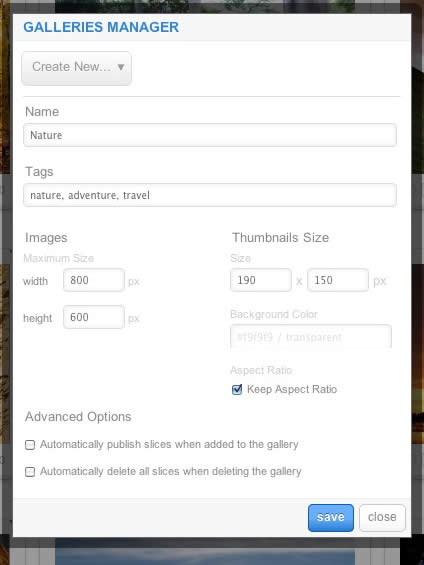
RokGallery is a tagged based gallery component, therefore, Galleries are controlled by tags and not specific photos in albums. Subsequently, you can easily have one master photo in multiple albums with ease.

RokGallery

A single image can appear in numerous galleries based on its tag, and also can be different sizes based on the gallery settings, without editing the original image.

  • Dropdown: To create a new Gallery, select Create New, or the name of another Gallery to edit it
  • Name: Set the name of the Gallery
  • Tags: Set the tags that are associated with the gallery (separate via a comma)
  • Images: Set the maximum height and width of the full image
  • Thumbnails Size: Set the height and width of the thumbnails
  • Background Color: Set the background color for the thumbnail surround
  • Aspect Ratio: Check if you wish to keep the dimensions of the image intact, or cropped.

Remember to Publish a Gallery after clicking Save. If you make any changes to a Gallery, whether in the Galleries Manager, or in the Image Slice Editor, you will need to re-Save in the Galleries Manager for the changes to take place on the site.

RokGallery RokGallery RokGallery

Image Editor

RokGallery has a very advanced image editor, akin to a native application. The various parts will be discussed below.

After selecting the edit button, you will be able to edit the META data of the image, the image itself, plus delete or publish the image.

  • Title: The name of the image file to be displayed on the frontend gallery
  • Slug: The individual identifier for an image (we recommend not to change)
  • Description: The description of the image file shown on the frontend gallery
  • Tags: Add the tags that you wish to associate with the image
  • Slicing: Edit the image
  • Publish:Show or Hide an image for specific tags/galleries.

RokGallery

In the Slice Editor, you can edit the META data and the actual image. You can crop the image, similar to that of an native application, with a set or variable marquee, in addition to Zoom controls. Edits in the Slice Editor are on a per gallery/tag basis.

The original image that was uploaded is maintained, as a new image is created after applying the crop. This can be reverted at any time from the Slice Editor.

RokGallery

Additionally, you can also Share the slice via the Share button, or Delete the image via the Delete button, from the Image Editor:

RokGallery RokGallery

Multi-Tagging

Tagging is at the core of RokGallery, and with its multi-selection ability, you can easily manage tags across multiple images with great ease. Simply highlight several images and click Tags. Here, you can add, remove, or change any common tags applied to your selection.

If you wanted to quickly move several images to another gallery, simply change their tag.

RokGallery

Filtering

RokGallery

A system based on tagging needs an advanced search facility, so RokGallery employs a simple but powerful filtering mechanism:

Filter Type

  • Tags
  • Gallery
  • Published
  • File Size
  • Width
  • Height

Filter Operation

  • Is
  • Is Not
  • Contains
  • Does not Contain
  • Greater than
  • Lesser than

Order by Type (Asc/Des)

  • Title
  • Created At
  • Updated At
  • File Size
  • Width
  • Height

RokGallery RokGallery

RokGallery RokGallery

Filters are not singular and can be applied cumulatively:

RokGallery RokGallery

Read 7832979 times Last modified on Sunday, 30 October 2011 00:17

205621 comments

  • Comment Link jeuxpokerenligne.net Thursday, 07 May 2026 18:29 posted by jeuxpokerenligne.net

    I'm curious to find out what blog platform you're using?
    I'm having some small security problems with my latest website and
    I would like to find something more safeguarded.
    Do you have any recommendations?

  • Comment Link https://1xbet-bvt0.buzz/ Thursday, 07 May 2026 18:26 posted by https://1xbet-bvt0.buzz/

    1xbet зеркало, 1хбет зеркало рабочее
    предлагает пользователям возможность входа к всевозможным функциям
    сайта в случае если блокировку.

  • Comment Link how to handle a PR crisis Thursday, 07 May 2026 18:24 posted by how to handle a PR crisis

    I am sure this article has touched all the internet
    people, its really really pleasant paragraph on building
    up new web site.

  • Comment Link adana escort bayan Thursday, 07 May 2026 17:50 posted by adana escort bayan

    Makalelerinizdeki faydalı bilgiler için teşekkürler. Blogunu yer işaretine
    ekleyeceğim ve burada sık sık tekrar tekrar
    kontrol edeceğim. Burada pek çok yeni şey öğreneceğimden oldukça emin. Sonrası için iyi şanslar!

  • Comment Link malatya escort Thursday, 07 May 2026 17:39 posted by malatya escort

    Bu blog neden bu kadar yavaş yükleniyor
    bilmiyorum. Başka biri bu sorun ile karşılaşıyor mu?
    Kendi cihazımdan mı kaynaklanıyor? Daha sonra yeniden bakacağım
    ve sorunun hala devam edip etmediğini göreceğim.

  • Comment Link diamond game Thursday, 07 May 2026 17:35 posted by diamond game

    My developer is trying to convince me to move to .net from PHP. I have always disliked the idea because of the costs. But he's tryiong none the less. I've been using WordPress on numerous websites for about a year and am anxious about switching to another platform. I have heard great things about blogengine.net. Is there a way I can transfer all my wordpress posts into it? Any kind of help would be really appreciated!

  • Comment Link dejeuxpoker.com Thursday, 07 May 2026 16:37 posted by dejeuxpoker.com

    An interesting discussion is definitely worth comment.
    I do believe that you should write more on this topic, it may not be a taboo matter but typically folks don't discuss
    these subjects. To the next! Best wishes!!

  • Comment Link cruelpoker.com Thursday, 07 May 2026 16:30 posted by cruelpoker.com

    I am really impressed with your writing skills as well as with the layout on your
    blog. Is this a paid theme or did you modify it yourself?
    Anyway keep up the excellent quality writing, it is rare to see a nice blog like this
    one these days.

  • Comment Link https://go88.archi/ Thursday, 07 May 2026 15:38 posted by https://go88.archi/

    Khám phá https://go88.archi/ – sân chơi giải trí trực tuyến nổi bật với game bài đổi thưởng, nổ hũ, bắn cá và tỷ lệ thưởng cực kỳ hấp dẫn cho người chơi.

  • Comment Link feck Thursday, 07 May 2026 14:26 posted by feck

    Hi there, I discovered your website by way of Google whilst looking
    for a similar topic, your website came up,
    it seems to be great. I have bookmarked it in my google
    bookmarks.
    Hi there, simply became alert to your weblog through Google,
    and located that it's truly informative. I'm gonna
    watch out for brussels. I will be grateful for those who continue
    this in future. Numerous people shall be benefited out of your writing.
    Cheers!

Leave a comment

Make sure you enter the (*) required information where indicated. HTML code is not allowed.