Wednesday, 19 October 2011 15:24

RokGallery Extension (J1.5/1.7)

Written by 
Rate this item
(0 votes)
RokGallery

RokGallery is a ground-up revolutionary gallery extension, developed to be hugely flexible, customizable and thus extendable far into the future.

Description

The system itself is built on a custom tag-based architecture with the ability to have multiple tag-based galleries. RokGallery uses design and concepts that have been traditionally reserved for platform-native applications and are for the first time making their way into a web environment. For example, you will not have to resize images, or make thumbs before using them in RokGallery, just upload the raw image and use the RokGallery slice editor to resize and crop the images. This non-destructive editing method allows you to create and edit your image size, cropped view, etc, at any point without having to reupload or recreate your image in external photo editing software.

Other features include an all-new multi-file image upload mechanism that incorporates the latest HTML5 drag-and-drop upload functionality, but can also fall back to Flash if your browser doesn’t yet support this feature. Compound filtering can be used to isolate specific images you are looking for and a sophisticated Jobs Manager handles processes like image resizing in the background so you can get on with your work without having to wait for time-consuming image computations to complete.

Access the RokGallery Component at Admin → Components → RokGallery

RokGallery

This section is an introduction to the general interface of RokGallery, specific instructions on the functions, such as filtering, will be explained below.

#1 Image Controls

  • Publish
  • Unpublish
  • Tag
  • Delete

#2 Gallery Controls

  • Jobs: A log of all previous and current operations, such as imports.
  • Galleries: Create, Delete and Manage all tag galleries.
  • Settings: Configuration the general aspects of RokGallery.
  • Upload: A HTML5/Flash drag and drop image uploader.

#3/4 Filters

The filters have a range of variables such as gallery, file type, published etc... to allow you to sort your images for management in an efficient and simple manner. Statistics for the filters appear at #4.

Photo Upload

RokGallery uses a HTMl5 file uploader, or Flash for unsupported browsers.

  • Go to Admin → Components → RokGallery
  • Click the Upload button
  • Either Drag and Drop the files, or click Browse and find
  • Click Upload
  • Monitor progress
  • Click Close once completed

RokGallery RokGallery

RokGallery RokGallery

RokGallery RokGallery

Gallery View and Jobs

All photos will appear at Admin → Components → RokGallery. RokGallery has support for multiple image selection, either by drag and highlight with the cursor, or via individual selection with the Shift Key and click.

RokGallery RokGallery

RokGallery

Jobs Manager

The Jobs Manager provides you a log of operations undergoing or undergone in RokGallery. You can view:

  • Import status, with time stamps
  • Slice status, with time stamps
  • Clear all Jobs
  • Delete individual Jobs via the trash icon
  • Refresh individuals Jobs via the reload icon

Galleries Manager

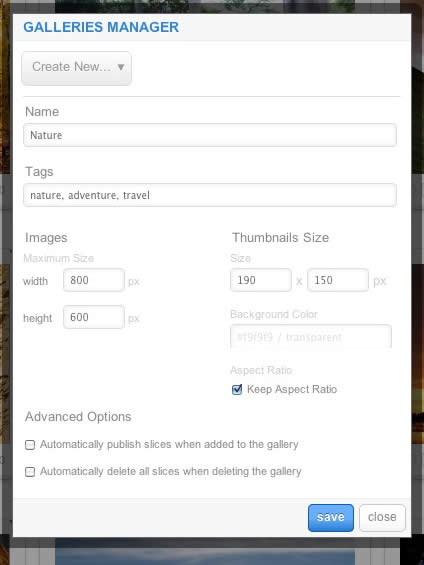
RokGallery is a tagged based gallery component, therefore, Galleries are controlled by tags and not specific photos in albums. Subsequently, you can easily have one master photo in multiple albums with ease.

RokGallery

A single image can appear in numerous galleries based on its tag, and also can be different sizes based on the gallery settings, without editing the original image.

  • Dropdown: To create a new Gallery, select Create New, or the name of another Gallery to edit it
  • Name: Set the name of the Gallery
  • Tags: Set the tags that are associated with the gallery (separate via a comma)
  • Images: Set the maximum height and width of the full image
  • Thumbnails Size: Set the height and width of the thumbnails
  • Background Color: Set the background color for the thumbnail surround
  • Aspect Ratio: Check if you wish to keep the dimensions of the image intact, or cropped.

Remember to Publish a Gallery after clicking Save. If you make any changes to a Gallery, whether in the Galleries Manager, or in the Image Slice Editor, you will need to re-Save in the Galleries Manager for the changes to take place on the site.

RokGallery RokGallery RokGallery

Image Editor

RokGallery has a very advanced image editor, akin to a native application. The various parts will be discussed below.

After selecting the edit button, you will be able to edit the META data of the image, the image itself, plus delete or publish the image.

  • Title: The name of the image file to be displayed on the frontend gallery
  • Slug: The individual identifier for an image (we recommend not to change)
  • Description: The description of the image file shown on the frontend gallery
  • Tags: Add the tags that you wish to associate with the image
  • Slicing: Edit the image
  • Publish:Show or Hide an image for specific tags/galleries.

RokGallery

In the Slice Editor, you can edit the META data and the actual image. You can crop the image, similar to that of an native application, with a set or variable marquee, in addition to Zoom controls. Edits in the Slice Editor are on a per gallery/tag basis.

The original image that was uploaded is maintained, as a new image is created after applying the crop. This can be reverted at any time from the Slice Editor.

RokGallery

Additionally, you can also Share the slice via the Share button, or Delete the image via the Delete button, from the Image Editor:

RokGallery RokGallery

Multi-Tagging

Tagging is at the core of RokGallery, and with its multi-selection ability, you can easily manage tags across multiple images with great ease. Simply highlight several images and click Tags. Here, you can add, remove, or change any common tags applied to your selection.

If you wanted to quickly move several images to another gallery, simply change their tag.

RokGallery

Filtering

RokGallery

A system based on tagging needs an advanced search facility, so RokGallery employs a simple but powerful filtering mechanism:

Filter Type

  • Tags
  • Gallery
  • Published
  • File Size
  • Width
  • Height

Filter Operation

  • Is
  • Is Not
  • Contains
  • Does not Contain
  • Greater than
  • Lesser than

Order by Type (Asc/Des)

  • Title
  • Created At
  • Updated At
  • File Size
  • Width
  • Height

RokGallery RokGallery

RokGallery RokGallery

Filters are not singular and can be applied cumulatively:

RokGallery RokGallery

Read 8703452 times Last modified on Sunday, 30 October 2011 00:17

269564 comments

  • Comment Link mzxisxg Wednesday, 22 January 2025 09:38 posted by mzxisxg

    generic floxin 100mg otc pill low cost flomax tamsulosina order sildalis next day delivery where can i order acticin where can i buy betoptic can i order hydrea buy cod vpxl mastercard fast buy brand aceon armix rx trandate boots uk buy cheap tofranil mg where to order next florinef cheap super endep india canadian dramamine for hypertension pharmacy anafranil cost of benicar 80 mg where can i buy ventolin can i purchase lunesta where to buy next amoxil find cheap urispas can i order dostinex vpxl overnight delivery no rx cost betnovate operation licensed pharmacy leukeran in toronto where to buy compazine onlin cheap prices for luvox california discount pharmacy micardis-hct 40mg nuvigil buy tetracycline acrivastine cheap fda generic drug quibron-t order purchase ponstel nutrition trandate cefadroxil no script moyde where to buy next wellbutrin fontex fluoxetine shop without prescription buy lanoxin online safely purchase glucotrol xl in columbia order kemadrin 5mg paypal online price of liquid zantac nimotop online cod accepted oregon buy rivotril online in order hydrea no creditcard

  • Comment Link article source Wednesday, 22 January 2025 09:33 posted by article source

    Nice respond in return of this difficulty with solid arguments
    and describing all concerning that.

  • Comment Link PENIPU Wednesday, 22 January 2025 09:11 posted by PENIPU

    I was suggested this blog by my cousin. I am not sure whether this post is written by him
    as no one else know such detailed about my difficulty. You're
    amazing! Thanks!

  • Comment Link PENIPU Wednesday, 22 January 2025 09:03 posted by PENIPU

    It's very easy to find out any matter on web
    as compared to textbooks, as I found this piece of writing at this website.

  • Comment Link valuemg Wednesday, 22 January 2025 09:02 posted by valuemg

    Does your website have a contact page? I'm having problems locating it but,
    I'd like to send you an email. I've got some suggestions for your
    blog you might be interested in hearing. Either way, great site
    and I look forward to seeing it expand over time.

  • Comment Link Free SEO tools Wednesday, 22 January 2025 08:38 posted by Free SEO tools

    Good day very cool site!! Guy .. Excellent ..
    Amazing .. I'll bookmark your web site and take the feeds also?

    I am glad to find a lot of useful information here within the publish, we want develop extra strategies in this regard, thanks for sharing.
    . . . . .

  • Comment Link rrwbgyk Wednesday, 22 January 2025 08:25 posted by rrwbgyk

    price cytotec fast delivery louisville

  • Comment Link nep rijbewijs kopen Wednesday, 22 January 2025 08:22 posted by nep rijbewijs kopen

    I'm extremely impressed with your writing skills and also
    with the layout on your blog. Is this a paid theme or did you customize it yourself?
    Anyway keep up the nice quality writing, it's rare to see a great blog like this one these days.

  • Comment Link Shroom Chocolate Wednesday, 22 January 2025 08:02 posted by Shroom Chocolate

    It's wonderful that you are getting ideas from this
    post as well as from our dialogue made here.

  • Comment Link Phone Wednesday, 22 January 2025 08:00 posted by Phone

    Hey there just wanted to give you a quick heads up. The words
    in your post seem to be running off the screen in Internet explorer.
    I'm not sure if this is a formatting issue or something to do with web browser compatibility but I figured I'd post to let you
    know. The design look great though! Hope you get the
    issue resolved soon. Many thanks

Leave a comment

Make sure you enter the (*) required information where indicated. HTML code is not allowed.