Wednesday, 19 October 2011 15:24

RokGallery Extension (J1.5/1.7)

Written by 
Rate this item
(0 votes)
RokGallery

RokGallery is a ground-up revolutionary gallery extension, developed to be hugely flexible, customizable and thus extendable far into the future.

Description

The system itself is built on a custom tag-based architecture with the ability to have multiple tag-based galleries. RokGallery uses design and concepts that have been traditionally reserved for platform-native applications and are for the first time making their way into a web environment. For example, you will not have to resize images, or make thumbs before using them in RokGallery, just upload the raw image and use the RokGallery slice editor to resize and crop the images. This non-destructive editing method allows you to create and edit your image size, cropped view, etc, at any point without having to reupload or recreate your image in external photo editing software.

Other features include an all-new multi-file image upload mechanism that incorporates the latest HTML5 drag-and-drop upload functionality, but can also fall back to Flash if your browser doesn’t yet support this feature. Compound filtering can be used to isolate specific images you are looking for and a sophisticated Jobs Manager handles processes like image resizing in the background so you can get on with your work without having to wait for time-consuming image computations to complete.

Access the RokGallery Component at Admin → Components → RokGallery

RokGallery

This section is an introduction to the general interface of RokGallery, specific instructions on the functions, such as filtering, will be explained below.

#1 Image Controls

  • Publish
  • Unpublish
  • Tag
  • Delete

#2 Gallery Controls

  • Jobs: A log of all previous and current operations, such as imports.
  • Galleries: Create, Delete and Manage all tag galleries.
  • Settings: Configuration the general aspects of RokGallery.
  • Upload: A HTML5/Flash drag and drop image uploader.

#3/4 Filters

The filters have a range of variables such as gallery, file type, published etc... to allow you to sort your images for management in an efficient and simple manner. Statistics for the filters appear at #4.

Photo Upload

RokGallery uses a HTMl5 file uploader, or Flash for unsupported browsers.

  • Go to Admin → Components → RokGallery
  • Click the Upload button
  • Either Drag and Drop the files, or click Browse and find
  • Click Upload
  • Monitor progress
  • Click Close once completed

RokGallery RokGallery

RokGallery RokGallery

RokGallery RokGallery

Gallery View and Jobs

All photos will appear at Admin → Components → RokGallery. RokGallery has support for multiple image selection, either by drag and highlight with the cursor, or via individual selection with the Shift Key and click.

RokGallery RokGallery

RokGallery

Jobs Manager

The Jobs Manager provides you a log of operations undergoing or undergone in RokGallery. You can view:

  • Import status, with time stamps
  • Slice status, with time stamps
  • Clear all Jobs
  • Delete individual Jobs via the trash icon
  • Refresh individuals Jobs via the reload icon

Galleries Manager

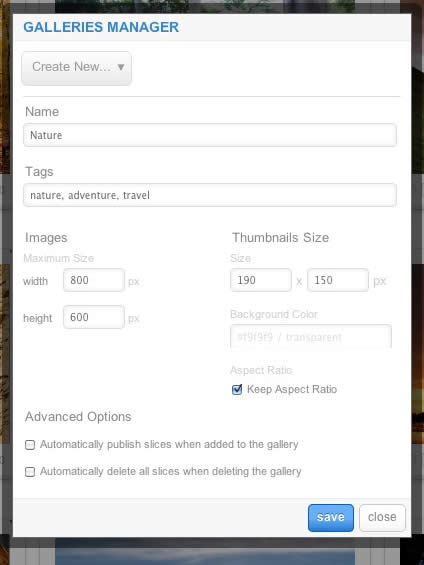
RokGallery is a tagged based gallery component, therefore, Galleries are controlled by tags and not specific photos in albums. Subsequently, you can easily have one master photo in multiple albums with ease.

RokGallery

A single image can appear in numerous galleries based on its tag, and also can be different sizes based on the gallery settings, without editing the original image.

  • Dropdown: To create a new Gallery, select Create New, or the name of another Gallery to edit it
  • Name: Set the name of the Gallery
  • Tags: Set the tags that are associated with the gallery (separate via a comma)
  • Images: Set the maximum height and width of the full image
  • Thumbnails Size: Set the height and width of the thumbnails
  • Background Color: Set the background color for the thumbnail surround
  • Aspect Ratio: Check if you wish to keep the dimensions of the image intact, or cropped.

Remember to Publish a Gallery after clicking Save. If you make any changes to a Gallery, whether in the Galleries Manager, or in the Image Slice Editor, you will need to re-Save in the Galleries Manager for the changes to take place on the site.

RokGallery RokGallery RokGallery

Image Editor

RokGallery has a very advanced image editor, akin to a native application. The various parts will be discussed below.

After selecting the edit button, you will be able to edit the META data of the image, the image itself, plus delete or publish the image.

  • Title: The name of the image file to be displayed on the frontend gallery
  • Slug: The individual identifier for an image (we recommend not to change)
  • Description: The description of the image file shown on the frontend gallery
  • Tags: Add the tags that you wish to associate with the image
  • Slicing: Edit the image
  • Publish:Show or Hide an image for specific tags/galleries.

RokGallery

In the Slice Editor, you can edit the META data and the actual image. You can crop the image, similar to that of an native application, with a set or variable marquee, in addition to Zoom controls. Edits in the Slice Editor are on a per gallery/tag basis.

The original image that was uploaded is maintained, as a new image is created after applying the crop. This can be reverted at any time from the Slice Editor.

RokGallery

Additionally, you can also Share the slice via the Share button, or Delete the image via the Delete button, from the Image Editor:

RokGallery RokGallery

Multi-Tagging

Tagging is at the core of RokGallery, and with its multi-selection ability, you can easily manage tags across multiple images with great ease. Simply highlight several images and click Tags. Here, you can add, remove, or change any common tags applied to your selection.

If you wanted to quickly move several images to another gallery, simply change their tag.

RokGallery

Filtering

RokGallery

A system based on tagging needs an advanced search facility, so RokGallery employs a simple but powerful filtering mechanism:

Filter Type

  • Tags
  • Gallery
  • Published
  • File Size
  • Width
  • Height

Filter Operation

  • Is
  • Is Not
  • Contains
  • Does not Contain
  • Greater than
  • Lesser than

Order by Type (Asc/Des)

  • Title
  • Created At
  • Updated At
  • File Size
  • Width
  • Height

RokGallery RokGallery

RokGallery RokGallery

Filters are not singular and can be applied cumulatively:

RokGallery RokGallery

Read 8922785 times Last modified on Sunday, 30 October 2011 00:17

270685 comments

  • Comment Link phwin Saturday, 28 March 2026 00:51 posted by phwin

    It's remarkable to visit this web site and reading the views of all colleagues regarding this piece of writing, while I am also eager of getting knowledge.

  • Comment Link Upsports Bet Saturday, 28 March 2026 00:49 posted by Upsports Bet

    Wow, this post is good, my younger sister is analyzing such things, therefore I am going to convey her.

  • Comment Link hot646 Saturday, 28 March 2026 00:46 posted by hot646

    Howdy, I do believe your blog might be having browser compatibility problems. When I take a look at your blog in Safari, it looks fine however, if opening in IE, it has some overlapping issues. I merely wanted to give you a quick heads up! Other than that, fantastic site!

  • Comment Link haha777 Saturday, 28 March 2026 00:43 posted by haha777

    I really like it whenever people get together and share ideas. Great blog, stick with it!

  • Comment Link fazobetai Saturday, 28 March 2026 00:40 posted by fazobetai

    Howdy! Someone in my Facebook group shared this site with us so I came to take a look. I'm definitely enjoying the information. I'm book-marking and will be tweeting this to my followers! Superb blog and excellent design and style.

  • Comment Link jolibet Saturday, 28 March 2026 00:39 posted by jolibet

    Howdy! I understand this is somewhat off-topic but I had to ask. Does managing a well-established blog such as yours require a massive amount work? I am brand new to running a blog however I do write in my journal daily. I'd like to start a blog so I can easily share my experience and feelings online. Please let me know if you have any kind of recommendations or tips for new aspiring bloggers. Thankyou!

  • Comment Link sportbet Saturday, 28 March 2026 00:38 posted by sportbet

    I am regular visitor, how are you everybody? This piece of writing posted at this site is really pleasant.

  • Comment Link 60win Saturday, 28 March 2026 00:38 posted by 60win

    Hey there! Do you know if they make any plugins to help with Search Engine Optimization? I'm trying to get my blog to rank for some targeted keywords but I'm not seeing very good gains. If you know of any please share. Thank you!

  • Comment Link lol646 Saturday, 28 March 2026 00:36 posted by lol646

    This blog was... how do I say it? Relevant!! Finally I have found something that helped me. Thank you!

  • Comment Link dobrowin Saturday, 28 March 2026 00:31 posted by dobrowin

    Hi! Do you know if they make any plugins to safeguard against hackers? I'm kinda paranoid about losing everything I've worked hard on. Any suggestions?

Leave a comment

Make sure you enter the (*) required information where indicated. HTML code is not allowed.